
Tablets have become powerful enough that the question is genuinely difficult — where a few years ago a laptop was almost always the more capable choice, modern tablets with keyboard accessories can handle tasks that once required a full computer. But capable doesn’t mean right for every situation.
This guide gives you a clear framework for deciding between a tablet and a laptop based on how you actually plan to use it, not just the spec sheets.
The Core Difference
A laptop is a computer that happens to be portable. It runs a full desktop operating system, supports virtually any software, and is designed around a keyboard and trackpad as primary inputs.
A tablet is a touchscreen device that can optionally use a keyboard. It runs a mobile or mobile-derived operating system, is optimized for touch interaction, and prioritizes portability and battery life over raw computing power.
The distinction has blurred considerably — iPads run iPadOS, which is increasingly capable; Windows tablets exist; and the iPad Pro with a Magic Keyboard looks and works like a thin laptop. But the fundamental design philosophy still shapes what each device does well.
When a Laptop Is the Better Choice
You need specific software that only runs on Windows or macOS If your work or studies require software that isn’t available on iPadOS or Android — professional video editing suites, development environments, specialized industry software, full versions of Adobe’s Creative Cloud — a laptop isn’t optional. Tablets can handle many productivity tasks, but they can’t run arbitrary desktop software.
You type a lot Laptops are built around keyboards. The keyboard is integrated, full-sized, and consistent. Tablet keyboards — even good ones like the Magic Keyboard for iPad — are add-on accessories that cost extra, change the device’s form factor, and still don’t quite match the feel of a proper laptop keyboard for sustained typing.
If you write essays, reports, code, or anything that involves extended typing sessions, a laptop is the more comfortable tool.
You need to run multiple demanding apps simultaneously Laptops handle multitasking more gracefully — multiple browser windows, a document, a spreadsheet, and a communication app all running side by side is routine on a laptop and still somewhat constrained on most tablets.
Budget is a priority At equivalent price points, a laptop typically offers more computing power than a tablet. A €400 laptop runs full Windows and handles most everyday tasks comfortably. A €400 tablet is mid-range and limited to its app ecosystem.
When a Tablet Is the Better Choice
You primarily consume content Reading, streaming video, browsing, social media, light email — tablets are exceptional for these tasks. The touchscreen is more intuitive for content consumption than a trackpad, the screen-to-body ratio is better, and battery life is typically longer than an equivalent laptop.
You want the lightest, most portable option A tablet without a keyboard case is significantly lighter and more portable than any laptop. For travel, commuting, or situations where you’re carrying it for long periods, the weight difference is meaningful.
You draw, sketch, or annotate Tablets with stylus support — iPad with Apple Pencil, Samsung Galaxy Tab with S Pen — are the best tools available for digital drawing, design, note-taking with handwriting, and document annotation. No laptop matches the natural feel of a stylus on a tablet screen for these tasks.
You’re buying for a child or casual user For children, elderly users, or anyone whose needs are primarily entertainment and communication, a tablet is simpler to use, more durable in many cases, and less expensive than a laptop capable of the same basic tasks.
You use it primarily in tablet mode If you’re mostly reading in bed, watching on the couch, or using it on the go without a desk, the tablet form factor is more comfortable and practical than a laptop.
The Hybrid Option: Tablet with Keyboard
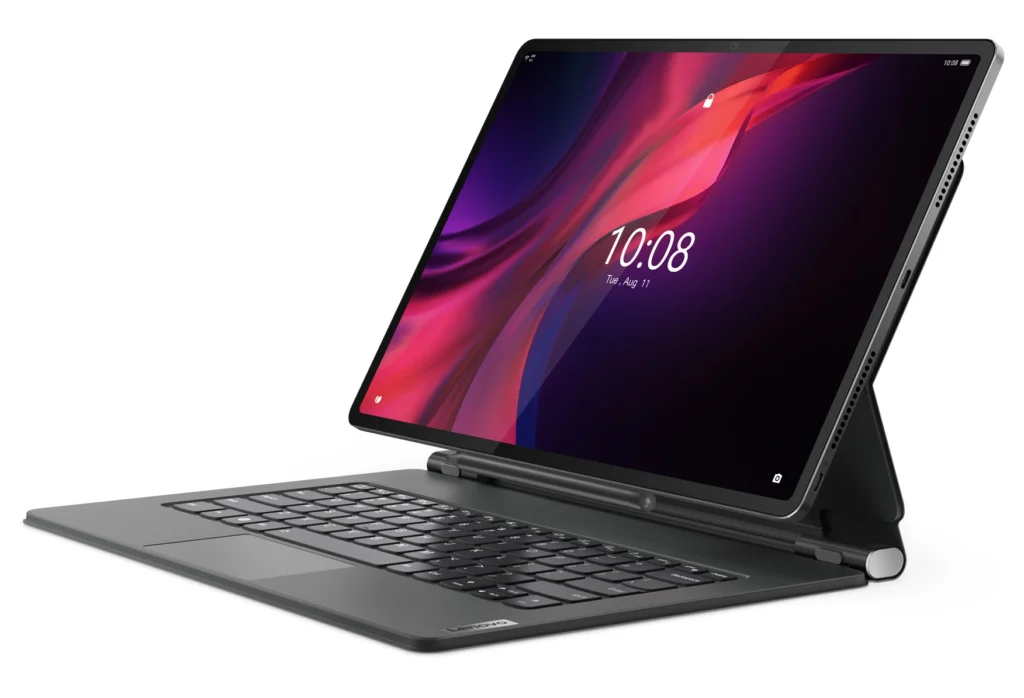
The middle ground — a tablet with a keyboard case — appeals to people who want portability and content consumption without giving up the ability to type and work. The most capable options:
iPad Pro with Magic Keyboard — The most polished tablet-as-laptop experience available. iPadOS has matured significantly, and for tasks that don’t require desktop software, it handles productivity work genuinely well. Expensive when combined with the keyboard.
Samsung Galaxy Tab S9 with keyboard — A strong Android alternative with DeX mode, which provides a desktop-like interface when connected to an external display. More flexible than iPad for connecting to peripherals and running certain types of software.
Microsoft Surface Pro — Runs full Windows, making it the most laptop-like tablet available. It handles desktop software the way no iPad or Android tablet can, at the cost of weight, price, and battery life compared to pure tablets.
The honest caveat: these hybrid setups are almost always more expensive than choosing either a dedicated tablet or a mid-range laptop. If budget is a consideration, a focused choice is usually better value.
Quick Decision Guide
| Your primary use | Better choice |
|---|---|
| Writing, coding, office work | Laptop |
| Streaming, reading, browsing | Tablet |
| Drawing and design | Tablet (with stylus) |
| Specific professional software | Laptop |
| Travel and portability | Tablet |
| Budget-conscious productivity | Laptop |
| Children and casual users | Tablet |
| All-day battery life | Tablet |
What About Doing Both?
Many people end up with both — a laptop for work and a tablet for everything else. This isn’t an unreasonable setup if both devices serve distinct purposes in your life. The mistake is buying both when one would genuinely cover your needs.
Before deciding, ask yourself honestly: what will I use this for 80% of the time? The answer almost always points clearly to one form factor.
If you’re leaning toward a tablet and primarily use it for productivity, pairing it with the right apps makes a significant difference. Our guide on Best Free Apps to Organize Your Day covers tools that work well on tablets for managing tasks and schedules.
Frequently Asked Questions
Can a tablet replace a laptop completely? For some people, yes. If your work lives in a browser, you communicate primarily through apps, and you don’t need specialized desktop software, a capable tablet with a keyboard can replace a laptop for daily work. For people who need specific software or sustained heavy multitasking, a laptop remains necessary.
Is an iPad or Android tablet better? iPads are more polished and receive longer software support. Android tablets — particularly Samsung’s Galaxy Tab line — offer more flexibility with file management, peripheral connections, and customization. For most users, iPad is the more refined experience; for power users who want more control, Android tablets offer more options.
What’s the minimum budget for a decent tablet? The iPad (base model, not Pro or Air) starts around €350 and is the best value tablet for most users. In the Android world, the Samsung Galaxy Tab A series offers capable tablets from around €200. Below €150, compromises in performance and longevity become significant.
Should I buy a laptop or tablet for university? For most university students, a laptop is the safer choice — assignments, research, and specific software requirements are easier to handle on a full operating system. A tablet can be a useful companion for reading and note-taking, but as a sole device it may limit your options. See our guide on Best Apps for Students (Free and Useful) for tools that work on either platform.
Do tablets support external monitors? Most modern tablets do — iPad Pro supports external displays via USB-C, and Samsung’s DeX mode extends the desktop to an external screen. The experience varies by device and use case, but it’s a genuinely useful feature for working at a desk.
Final Thoughts
The right answer depends entirely on what you’ll actually use the device for. A laptop remains the more versatile tool for work and study that involves sustained typing and specialized software. A tablet is the better companion for content consumption, travel, drawing, and casual use.
If your needs are genuinely split, a mid-range laptop paired with a basic tablet is often better value than one expensive hybrid device trying to do both things adequately.
Whatever you choose, getting it set up properly from the start saves time later. Our guide on Essential Apps You Should Have on Your Phone applies equally to tablets — the same core apps make any device significantly more useful out of the box.