
The average person picks up their phone over 50 times a day. For most of us, the majority of those interactions weren’t planned — a notification pulled us in, boredom triggered a reflex, or we picked it up to check something specific and emerged twenty minutes later having done everything except that thing.
The phone itself isn’t the problem. It’s one of the most powerful tools ever created for managing your time, organizing your life, and getting things done. The problem is that the same device is also designed — deliberately, by teams of engineers — to capture and hold your attention as long as possible.
This guide is about taking back control. Not by using your phone less, but by using it differently.
The Core Shift: From Reactive to Intentional
Most people use their phone reactively. The phone decides when you engage with it — through notifications, badges, and sounds — and you respond. This puts the phone in control of your attention, not you.
The shift to productive phone use is simple in principle: you decide when you engage with your phone, and what for. Every change in this guide supports that shift in one way or another.
1. Redesign Your Home Screen
Your home screen is the first thing you see every time you unlock your phone. If it’s full of social media apps, news apps, and games, that’s what you’ll reach for — not because you decided to, but because they’re there.
Redesign it with intention:
- Keep only your most productive apps on the first screen — calendar, task manager, notes, and any tools you use deliberately every day
- Move social media apps off the home screen entirely — put them in a folder on page two or three. You can still access them, but the extra step breaks the automatic reflex
- Remove anything you open out of boredom rather than purpose — if you can’t justify why it’s on your home screen, it shouldn’t be there
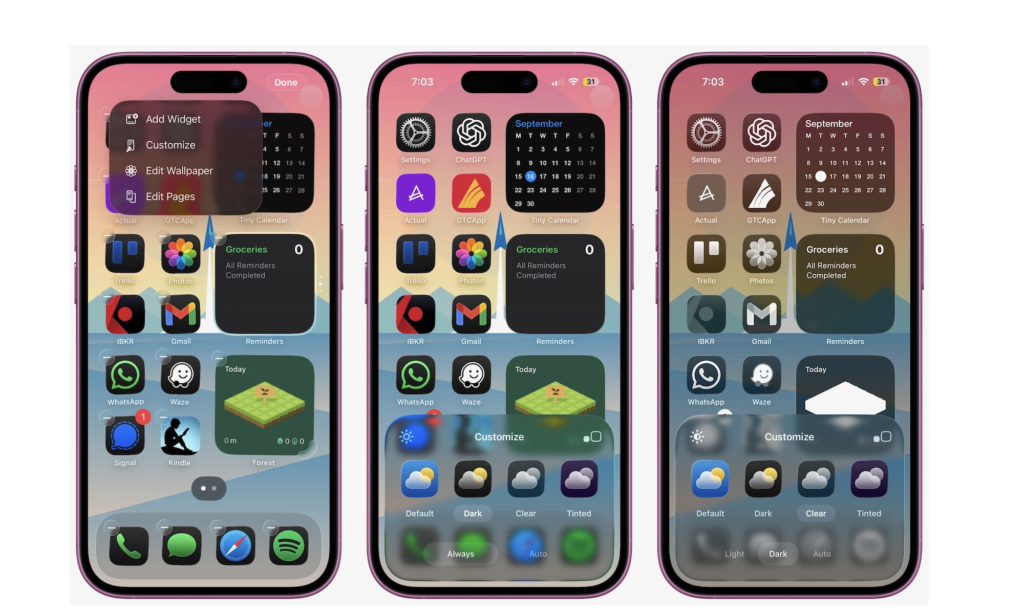
The goal is a home screen that prompts productive actions instead of passive consumption. When you unlock your phone and see your calendar and task manager instead of Instagram and YouTube, your behavior follows.
2. Turn Off Every Non-Essential Notification
Notifications are the primary mechanism by which apps steal your attention. Every buzz, banner, and badge is a context switch — it pulls you out of what you were doing and redirects your focus to whatever the app wants you to see.
Most notifications are not urgent. Most are not even useful. They exist because apps that send notifications get more engagement, which benefits the app — not you.
Go through your notification settings and turn off everything that doesn’t genuinely require your immediate attention:
- Keep on: calls, messages from real people, calendar reminders, navigation alerts
- Turn off: social media likes and comments, news headlines, promotional emails, app update prompts, game notifications
On Android: Settings → Notifications → App Notifications On iPhone: Settings → Notifications → select each app
The goal isn’t zero notifications — it’s intentional notifications. The ones that remain should be things you’d actually want to be interrupted for.
3. Use Your Phone’s Built-In Focus Modes
Both Android and iPhone have built-in focus modes that filter notifications and limit distractions based on what you’re doing. They’re underused by most people and genuinely useful.
On iPhone — Focus Modes: Go to Settings → Focus. You can create custom modes for Work, Sleep, Personal, or any activity. Each mode lets you specify which apps and people can send you notifications, and which are silenced. You can set them to activate automatically at certain times or locations.
On Android — Digital Wellbeing / Focus Mode: Settings → Digital Wellbeing → Focus Mode. Select the apps you want to pause, and they become inaccessible while Focus Mode is active — the icons grey out and notifications are silenced.
Setting a Work focus mode that silences everything except your calendar and messaging app during working hours is one of the highest-impact changes you can make to your daily productivity.
4. Schedule Your Phone Use Instead of Checking Constantly
One of the biggest productivity drains isn’t any single distraction — it’s the constant, low-level checking. Email every ten minutes. Social media every twenty. News whenever there’s a spare moment.
Batch your checking instead. Set specific times when you’ll look at email, social media, and news — and don’t look outside those windows. For most people, three times a day (morning, midday, evening) is more than sufficient for email and social media.
This works because the cost of checking isn’t just the time spent — it’s the mental overhead of switching contexts. Every time you check something and switch back to work, your brain takes time to refocus. Batching eliminates most of that overhead.
5. Replace Passive Consumption with Active Use
The difference between a productive phone session and an unproductive one often comes down to whether you had a purpose before you picked it up.
Passive use: picking up the phone without a specific reason and scrolling until something catches your attention.
Active use: picking up the phone to do a specific thing — add a task, check your calendar, send a message, look up information — and putting it down when that thing is done.
Before you pick up your phone, ask: what am I picking this up to do? If you don’t have an answer, put it back down.
This sounds almost too simple, but the habit of having a purpose before engaging with your phone changes the dynamic significantly over time.
6. Use the Right Apps for the Right Jobs
A productive phone setup uses apps that help you capture, organize, and act — not apps that consume your time without a clear output.
The apps worth having on a productive phone:
For tasks and deadlines: A reliable task manager like Todoist or Microsoft To Do ensures nothing falls through the cracks. Add tasks the moment they occur to you rather than trying to remember them. Our guide on Best Task Management Apps for Daily Use covers the best options in detail.
For notes and ideas: Google Keep for quick capture, Notion for anything that needs more structure. The moment an idea occurs to you — in a meeting, on a walk, before you fall asleep — it goes into the app. Our guide on Best Note-Taking Apps in 2026 covers which tool fits which style of thinking.
For scheduling: Google Calendar, used actively. Not just for meetings — for blocking time to work on specific tasks, which turns your calendar from a passive record of obligations into an active plan for your day.
For focus: Forest or a simple Pomodoro timer. When you need to work without interruption, set a timer and commit to it. The structure of a timer makes it easier to resist the impulse to check your phone because there’s a defined end point.
7. Create Physical Distance When You Need to Focus
No app setting or productivity technique is as effective as simply not having your phone within reach when you need to concentrate.
When you’re working on something that requires sustained attention — writing, studying, a difficult problem — put your phone in another room or in a bag. Out of sight genuinely means out of mind. The temptation to check it disappears when it’s not there to be checked.
This isn’t about willpower. It’s about removing the trigger. When the phone is on your desk, every quiet moment is an opportunity to pick it up. When it’s in another room, that opportunity doesn’t exist.
For work sessions at home, a dedicated charging spot in a different room from where you work is one of the simplest and most effective productivity setups available.
8. Audit Your Screen Time Weekly
Both Android and iPhone track exactly how much time you spend on each app. Most people who check this for the first time are surprised — usually uncomfortably so.
On iPhone: Settings → Screen Time On Android: Settings → Digital Wellbeing → Dashboard
Look at your weekly totals, particularly for social media and entertainment apps. This data doesn’t tell you what to do, but it makes the cost of passive phone use visible — and visible costs are easier to change than invisible ones.
Set weekly limits for the apps you want to spend less time on. When you hit the limit, the app locks and requires you to consciously override it. The friction is the point.
9. Keep Your Phone Out of the Bedroom
Using your phone in bed — scrolling before sleep, checking it first thing in the morning — is one of the most common and most damaging productivity habits most people have.
The blue light from screens interferes with melatonin production and delays sleep. But more significantly, starting and ending the day with passive consumption sets a reactive tone that carries through your waking hours. The first thing you see in the morning shapes your mental state for hours afterward.
Charge your phone outside the bedroom. Use a dedicated alarm clock if you need one. The first ten minutes of your morning and the last ten minutes before sleep are worth protecting.
10. Make Your Phone Faster and Cleaner
A phone cluttered with unused apps, low storage, and slow performance creates friction for productive use and temptation for passive use — you open something to do a quick task, it loads slowly, and while you wait you end up somewhere else entirely.
Keeping your phone fast and clean supports productive use practically. Our guides on How to Make Your Phone Faster in Simple Steps and How to Free Up Space Without Deleting Important Photos cover the most effective ways to keep your device running well.
Frequently Asked Questions
Is it realistic to reduce phone use significantly without it affecting my work or social life? Yes — for most people, the goal isn’t less phone use overall, it’s less unintentional phone use. The time spent on deliberate, purposeful phone use rarely needs to decrease. What changes is the reflexive, passive checking that fills gaps in the day without adding value.
How long does it take to build better phone habits? Research on habit formation suggests three to four weeks of consistent practice before a new behavior becomes automatic. The first week is the hardest — the impulse to check your phone is strong and the new habits feel effortful. By week three, the intentional patterns start to feel natural.
What’s the single most impactful change on this list? Turning off non-essential notifications. It removes the primary mechanism by which apps pull you in reactively and gives you back control over when you engage with your phone.
My job requires me to be constantly reachable — how do I balance that with focus? Most “constant availability” requirements are actually “available within a reasonable window” requirements in practice. Define what genuinely requires an immediate response (direct calls, urgent messages from specific people) and set up your focus modes to allow only those through. Everything else can wait 30-60 minutes without real consequence.
Does using my phone for productivity apps make the distraction problem worse? Not if the apps are used with intention. Opening Todoist to add a task and closing it takes thirty seconds. The risk is opening a productive app and then drifting to a distracting one while you have the phone in your hand — which is where the home screen redesign and batched checking habits become important.
Final Thoughts
Your phone is neither the problem nor the solution — it’s a tool, and tools work well or badly depending on how you use them. The same device that wastes hours of your day is capable of making you significantly more organized, more focused, and more in control of how you spend your time.
The changes in this guide don’t require willpower or radical behavior shifts. They require a few deliberate decisions about how your phone is set up and used — decisions you make once and then benefit from every day.
Start with notifications and your home screen. Those two changes alone will make a noticeable difference within a week.
For the apps that support a productive phone setup, our guide on Essential Apps You Should Have on Your Phone covers the complete toolkit.